

Onboarding: 6-12 Education Health Instructors Using G-W Online

Apr 15, 2026
921

We're excited to have you join us and to welcome you to our onboarding and training program, G-W Launchpad.
The following checklist is for customers using G-W Online (www.g-wonlinetextbooks.com) to access their online textbook and digital resources.
6-12 Education Health Instructors using G-W Online, Checklist:
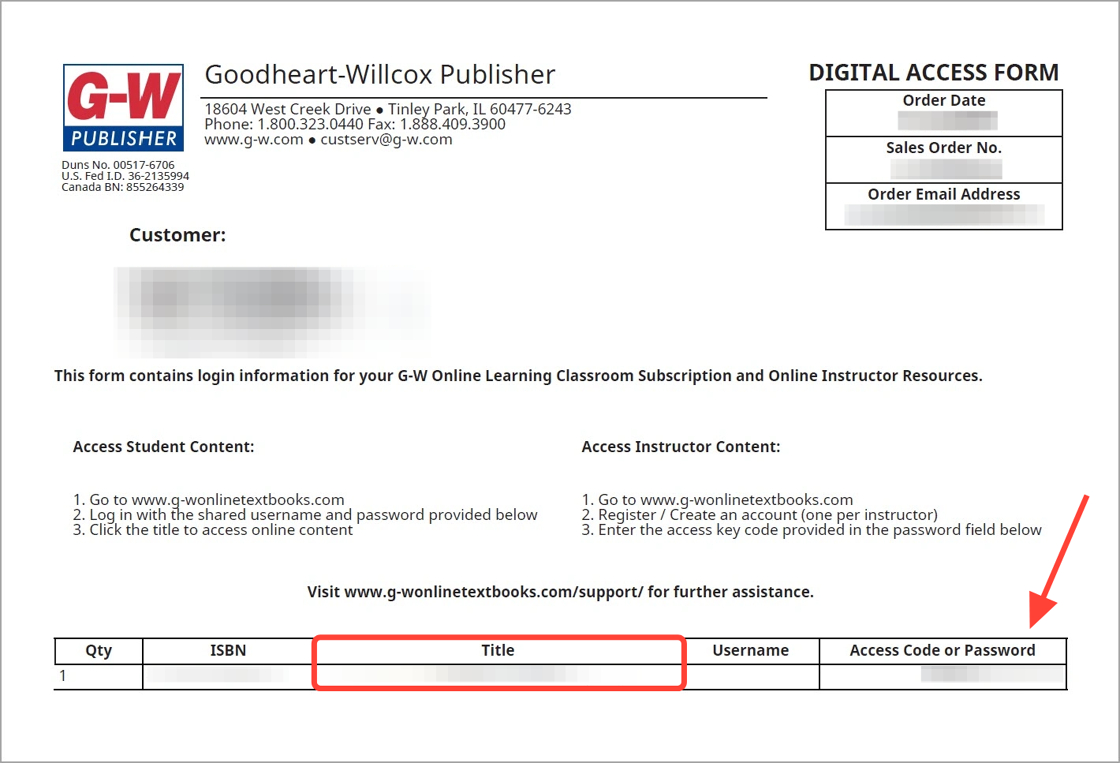
- I received my instructor access code: Your school district contact will receive a Digital Access Form that will contain one 16-digit access key code for each instructor.
- The access code may be found under Access Code or Password.
- Each instructor may redeem one key code.
- If you do not have this form, please ask the appropriate contact (i.e. Health Education Coordinator, Curriculum Coordinator, or whomever has purchased these resources).
- I reviewed the Quick-Start Guide for Instructors.
Please return to the G‑W onboarding email to explore additional features and resources, including how to use G-W resources in Google Classroom.
If you are receiving the G-W Onboarding Email Series, that means either you or someone on your behalf has enrolled you in G-W Onboarding to help you get started with everything G-W has to offer.


