You are using an unsupported browser. Please update your browser to the latest version on or before July 31, 2020.
close
You are viewing the article in preview mode. It is not live at the moment.
Home > How-To Guides > Instructor/Admin > Accessibility > Alt Text: How to create additional Alt Text within PowerPoint
Alt Text: How to create additional Alt Text within PowerPoint
print icon


If you need more alt text to better meet the needs of your students here are the steps to do so.

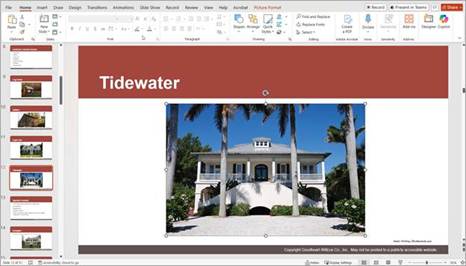
  1. Select image in the PowerPoint slide.

     
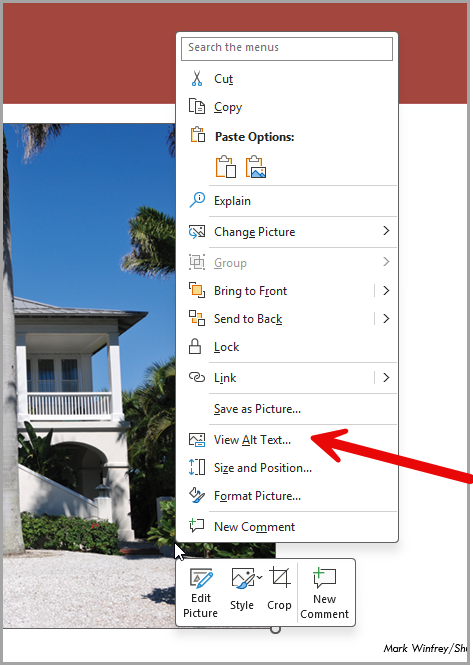
  2. Right click and select View Alt Text.

     
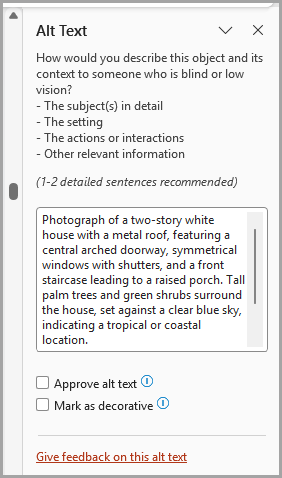
  3. ​In text box, ad alt text as desired.


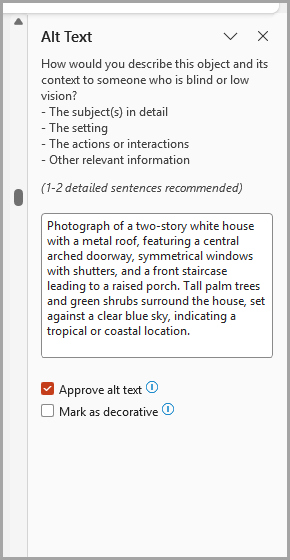
  1. Select Approve alt text

​​

Feedback
0 out of 0 found this helpful

scroll to top icon